


IMREAL.LIFE


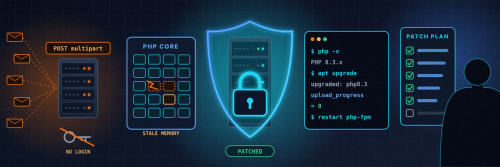
If your website runs on PHP, and roughly seven in ten websites do, this one needs your attention today. On 21 October (just after 1am on 22 October, Melbourne time) the PHP project released emergency fixes for two critical flaws, nicknamed PHP2Shell, that can let an attacker run their own code on your web server without logging in to anything. Details leaked online the day before the fix, and attack attempts were already being seen before the patch was out. The Australian Government's Australian Cyber Security Centre (ASD's ACSC) has issued a Critical alert and recommends organisations apply available security updates and other appropriate mitigations.
The good news: the fix is a normal package update and a restart. Here's what it is, how to check your server, and exactly what to do on Ubuntu.
What it is and who's affected
PHP2Shell is two memory-safety bugs in PHP itself, not in WordPress or any particular app:
- CVE-2026-109618, "RCE via OOM corruption". When PHP runs out of memory part-way through setting up a request, the clean-up code can treat half-built data as valid, which can be turned into remote code execution.
- CVE-2026-109619, "RCE via stale global state". Internal data from one request can survive after its memory has been freed, and a later request handled by the same PHP worker can use it. The confirmed attack path goes through PHP's session upload progress feature (
session.upload_progress.enabled), which is switched on by default and kicks in before any of your own code runs.
The Australian Government alert. ASD's ACSC published its alert on 21 October 2026 and last reviewed it on 22 October, with Alert Status: Critical. It says "all PHP versions from PHP 5 onwards may be affected" and that it "is not aware of successful active exploitation within Australia, related to these vulnerabilities". ASD's ACSC recommends organisations:
- Identify PHP within their environments
- Review the latest PHP guidance at php.net
- Apply available security updates and other appropriate mitigations
- Monitor PHP applications and related systems for suspicious activity
If your organisation has been affected, suspects it has, or needs advice, the Australian Cyber Security Hotline is 1300 CYBER1 (1300 292 371).
The PHP project rates both 9.2 out of 10 (CVSS v4.0) and says all PHP installations serving web requests are at risk, including PHP-FPM, Apache with mod_php, php-cgi, FrankenPHP and LiteSpeed. It considers mod_php the highest risk, because a single unauthenticated request can trigger the attack.
Because the bug is in PHP, it doesn't matter how secure your application is. WordPress, Drupal, Joomla, MediaWiki, Magento, Laravel and plain custom PHP sites are all exposed if the PHP underneath is unpatched. The researchers demonstrated it on WordPress, Drupal and Joomla, and even a "Hello World" page on an affected PHP version is vulnerable. Updating WordPress or your plugins does not fix it.
The fixed upstream releases are PHP 8.5.12, 8.4.27, 8.3.36 and 8.2.35. PHP 8.1 and older no longer get official releases, although the PHP team published source backports for 7.4, 8.0 and 8.1, and Linux distributions have patched their own packages.
How big is it? Censys counted about 1.57 million internet-facing hosts on unpatched PHP versions on 21 October. CISA, the NSA, the FBI, the UK's NCSC and CERT-EU all urged immediate patching, and said that systems which can't be patched or mitigated should be taken offline until they are. Japan's Prime Minister posted the same advice on X. Plenty of organisations did exactly that: the Dutch parliament's website, the Port of Rotterdam's website, Dutch government portals, Finnish government web services, French prefecture sites, parts of Wikimedia's tools, the Internet Archive and forums such as Something Awful all went offline for a while as a precaution. Those were precautions, not confirmed hacks.
Check your server in five minutes
1. Check your PHP version.
php -v
2. On Ubuntu, check the package version too. This matters, because Ubuntu backports security fixes without changing the headline version number. A fully patched Ubuntu 24.04 server still says "PHP 8.3.6" in php -v, so look at the package release instead:
dpkg -l | grep -E 'php[0-9.]+-(fpm|cli|cgi)|libapache2-mod-php'
Ubuntu's fixed package versions (USN-8948-1) are:
- Ubuntu 24.04 LTS: php8.3 8.3.6-0ubuntu0.24.04.13 or later
- Ubuntu 22.04 LTS: php8.1 8.1.2-1ubuntu2.28 or later
- Ubuntu 26.04 LTS: php8.5 8.5.4-0ubuntu1.5 or later
- Ubuntu 20.04 LTS: php7.4 7.4.3-4ubuntu2.29+esm5, available only with Ubuntu Pro (free for personal use)
If you installed PHP from a third-party repository, such as a PPA, check that its version is at least the fixed upstream release for your branch (8.2.35, 8.3.36, 8.4.27 or 8.5.12).
3. Check the upload progress setting your web server actually uses. The command-line php can read a different php.ini from Apache or PHP-FPM, so check the web server's own config files:
grep -H "session.upload_progress.enabled" /etc/php/*/fpm/php.ini /etc/php/*/apache2/php.ini 2>/dev/null
A commented-out line, or no line at all, means it's on (the default). For a definitive answer, put a phpinfo() page on the site for a minute, search it for session.upload_progress.enabled, and then delete the page straight away. Never leave a phpinfo page online.
Patch it on Ubuntu (Apache and PHP-FPM)
1. Back up first. Take a snapshot or backup of the server and the site's database.
2. Install the updates.
sudo apt update
sudo apt upgrade
On Ubuntu 20.04, attach Ubuntu Pro first (sudo pro attach <your-token>), then run the same two commands.
3. Restart every PHP process. The fix doesn't take effect until the old workers are gone. Use the version number that matches your server:
sudo systemctl restart php8.3-fpm
sudo systemctl restart apache2
If you run mod_php, restarting Apache is the step that matters. Restart any other long-running PHP workers too, such as queue workers and Docker containers. A PHP container image must be rebuilt or re-pulled on a fixed version, not just restarted.
4. Turn off session upload progress, whether you've patched yet or not. Few sites use upload progress bars, and the PHP project suggests leaving it off after patching if you don't need it. Edit /etc/php/8.3/fpm/php.ini and, if you use mod_php, /etc/php/8.3/apache2/php.ini, and set:
session.upload_progress.enabled = 0
Or set it in your PHP-FPM pool file (for example /etc/php/8.3/fpm/pool.d/www.conf) so applications can't override it:
php_admin_flag[session.upload_progress.enabled] = off
Then restart PHP-FPM and Apache again. Setting it with ini_set() or a .user.ini file doesn't work, because those apply too late.
Be clear about what that setting does and doesn't do. It blocks the confirmed session-upload path for CVE-2026-109619, but not other variants of that bug, and it does nothing for CVE-2026-109618. On PHP 8.5, also set fatal_error_backtraces = 0. The PHP advisory lists further stopgaps for the memory bug, such as memory_limit = -1 with container memory limits and a lower post_max_size, but they have side effects and are only partial. Hiding errors with display_errors or @ doesn't help either. Patching is the only complete fix. If you can't patch or mitigate today, do what the agencies advise and take the site offline until you can.
5. Check it worked. Re-run the dpkg -l command and confirm the fixed package version, confirm the setting is off with a temporary phpinfo page (then delete it), and load your site and its forms to make sure everything still works.
6. Look for signs of trouble. If the server was unpatched and online over the past week, look for unexplained PHP worker crashes or restarts, bursts of HTTP 500 errors or memory-limit errors after unusual upload requests, PHP processes starting shells or downloading files, and new cron jobs, users or files you didn't create. The bug can also leak memory, so if anything looks off, rotate the passwords, API keys and database credentials the site uses. One more warning: JFrog reports fake "PoC exploit" code and prank malware for PHP2Shell circulating on GitHub. Don't run exploit code of unknown origin on your own machines.
If you self-host AI tools as well, our earlier checklist covers firewalls, binding services to localhost and patching on a schedule: Lock down your self-hosted AI in an afternoon.
It's not just PHP: a rough week for anyone running their own servers
Several other serious issues landed in the same week. Briefly, and only the ones we could confirm:
- GitLab. GitLab released a critical patch for a flaw rated 10.0 out of 10 (CVE-2026-110264) that allows remote code execution and affects self-managed GitLab going back to version 7.0 from 2014. If you self-host GitLab, upgrade now.
- LiteLLM. LiteLLM's 1.107.0 release was compromised on 21 October: the PyPI wheels and the official Docker images, including
latest, carried a credential stealer and a remote code loader. If you installed or pulled it, treat that machine as compromised, rebuild it, pin a clean version and rotate every key it could reach. It's the second time this year LiteLLM's releases have been hijacked. - Railway and Zeabur. Railway paused builds and deployments after possible unauthorised access to environment variables and has asked users to rotate the secrets stored there. Zeabur disclosed its second breach in two months and says it's shutting down by the end of the year.
- TiDB Cloud. PingCAP says stolen credentials gave someone access to internal systems from 9 September to 7 October. An extortion group claims it took 10.6 TB, which PingCAP hasn't confirmed.
- Node.js and Plex. Node.js shipped fixes for a remote code execution bug and TLS certificate checking bypasses, and CISA has listed Plex Media Server flaws as actively exploited. Update both.
- Tor. More than 300 Tor exit relays were reportedly hijacked earlier this month to intercept SSH logins and capture passwords. Use SSH keys, not passwords.
- eMudhra. Eight intermediate certificate keys at Indian certificate authority eMudhra turned out to be tiny numbers that were trivial to recover, one of them literally "4". The certificates have been revoked.
The common thread is the one from our self-hosted AI checklist: know what's running, patch on a schedule, keep secrets out of places that can leak, and have a plan for when a supplier gets hit.
The takeaway
Patch PHP today, restart every PHP process, turn off session upload progress if you don't use it, and check you're really on the fixed package version. If a site can't be patched today, take it offline until it can. A few hours offline is a lot cheaper than a compromised server.
Need help? IRL can patch and harden your server
If you'd rather not do this yourself, or you're not sure what's running on your server, IRL can do it for you. Our server patching and hardening service includes:
- A version audit of every PHP runtime on the server, including PHP-FPM pools, Apache modules, containers and bundled control panels
- Patching PHP and the rest of the system to fixed versions, with a backup taken first and every PHP process restarted
- A config check of
session.upload_progressand the other PHP2Shell stopgaps, set in the right place so applications can't override them - A firewall and hardening review covering open ports, SSH, Fail2ban, TLS and the services you don't need exposed
- A post-patch check to confirm the fixed versions, test that your site still works and look for signs of compromise
There's no fixed price, because every server is different: it depends on the server and what's running on it. Tell us about your setup and we'll give you a quote. Get in touch here.
Rather learn to do it yourself? The 30-Day Sovereign Builder Challenge takes you from little or no technical background to running and hardening your own Linux servers, including patching, firewalls and Fail2ban, alongside other builders in the IRL community.
Got a question about patching your own setup? Post it in the comments below.
General information only, not professional security advice. Always back up before making changes to a live server.
Sources
- Australian Cyber Security Centre (ASD's ACSC), "Critical vulnerabilities in PHP" (Critical alert, published 21 Oct 2026, reviewed 22 Oct 2026): https://www.cyber.gov.au/alert/critical-vulnerabilities-in-php
- PHP, security advisory and releases (21 October 2026): https://www.php.net/
- PHP2Shell research site (Wiz Research, OpenAI and Calif): https://php2shell.com
- Ubuntu, USN-8948-1: PHP vulnerabilities: https://ubuntu.com/security/notices/USN-8948-1
- Ubuntu, CVE-2026-109619 status (incl. 20.04 Ubuntu Pro fix): https://ubuntu.com/security/CVE-2026-109619
- CISA, "Critical Vulnerabilities in PHP Require Immediate Patching": https://www.cisa.gov/news-events/alerts/2026/10/21/critical-vulnerabilities-php-require-immediate-patching
- NSA advisory on PHP: https://www.nsa.gov/Press-Room/Press-Releases-Statements/Press-Release-View/Article/4630238/nsa-advisory-critical-patches-recommended-for-php-vulnerabilities/
- UK NCSC, "Critical security issue affecting PHP": https://www.ncsc.gov.uk/news/critical-security-issue-affecting-php
- CERT-EU, "Critical Vulnerabilities in PHP": https://www.cert.europa.eu/publications/security-advisories/2026-018/
- AP News, "Governments, companies rush to patch a PHP vulnerability": https://apnews.com/article/php-websites-fbi-europe-vulnerability-a0af9576808a0963efca8df14d4b5183
- Akamai, "Understanding PHP2Shell": https://www.akamai.com/blog/security-research/understanding-php2shell-everything-you-need-to-know
- SecurityWeek, "PHP2Shell Exploitation Started Days Before Patches" (Censys figures): https://www.securityweek.com/php2shell-exploitation-started-days-before-patches/
- Nippon.com (Jiji Press), "Japan Govt Issues Rare Calls over PHP Flaw": https://www.nippon.com/en/news/yjj2026102200999/japan-govt-issues-rare-calls-over-php-flaw.html
- NL Times, Dutch parliament website taken offline: https://nltimes.nl/2026/10/21/dutch-parliament-website-taken-offline-cybersecurity-warning-triggers-precautions
- NT, Port of Rotterdam takes its website offline: https://www.nt.nl/havens/2026/10/21/haven-rotterdam-zet-website-uit-verder-geen-impact-pho-situatie/
- Wikipedia, "PHP2Shell" (outage overview, with references): https://en.wikipedia.org/wiki/PHP2Shell
- GitLab critical patch release 19.5.1: https://docs.gitlab.com/releases/patches/patch-release-gitlab-19-5-1-released/
- LiteLLM, 1.107.0 security incident: https://docs.litellm.ai/blog/security-incident-oct-21-2026
- Railway, security disclosure (21 October): https://blog.railway.com/p/security-disclosure-wednesday-october-21st
- Zeabur, "Zeabur is shutting down": https://zeabur.com/blogs/zeabur-is-shutting-down
- PingCAP, October 2026 security incident report: https://www.pingcap.com/trust-hub/security/security-update-october-2026/
- Node.js, October 2026 security releases: https://nodejs.org/en/blog/vulnerability/october-2026-security-releases
- CISA, KEV additions (20 October 2026): https://www.cisa.gov/news-events/alerts/2026/10/20/cisa-adds-six-known-exploited-vulnerabilities-catalog
- Ars Technica, Tor exit nodes hijacked to intercept SSH: https://arstechnica.com/information-technology/2026/10/300-tor-exit-nodes-hijacked-to-intercept-ssh-traffic-and-retrieve-plaintext-email/
- The Register, eMudhra private keys compromised: https://www.theregister.com/security/2026/10/20/indian-certification-authority-emudhras-private-keys-compromised-one-of-them-was-the-number-4/5304312
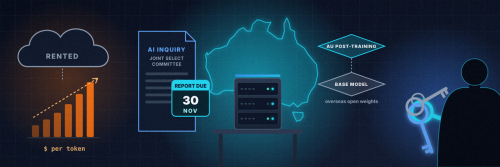
"You don't own your AI, you rent it." It's a line doing the rounds in Australian tech circles, and it's accurate for most businesses. Your prompts, your client data and your workflows run on someone else's servers, on someone else's terms, often in another country.
Renting is fine, until the price changes, the terms change, the model you built around gets retired, there's an outage, or a client asks where their data went. Owning at least part of your AI stack is how you take those risks off the table.
Australia is asking the same question
In August, Parliament set up a Joint Select Committee on Artificial Intelligence. Its remit covers issues including the workforce, data sovereignty and national security. Submissions closed on 14 September, and the committee has to report by 30 November.
James Newton-Thomas and his team read the 540 published submissions and tallied what people asked for. By their count, the top request, made in 121 submissions, was to build sovereign AI capability. Funding worker retraining came second with 118. That's their own analysis, not an official committee figure, but the message is clear: build it here, control it here, and help people learn to use it.
A local example, with caveats
At the end of September, Australian AI company Maincode open-sourced Matilda Jev, which it calls Australia's first "decision model". Instead of generating text, it answers a typed question (pick an option, yes or no, or a score) with a probability for each option. Maincode says it was post-trained and is served on Australian infrastructure, and the weights are on Hugging Face under the Apache 2.0 licence.
The balanced view matters here:
- The model card lists a Qwen 27B model, from Alibaba, as its base. So this is Australian post-training on an overseas open-weight model, not a model built from scratch here. Commenters on the launch post raised exactly this.
- The headline benchmark scores were run by Maincode itself, and they've been submitted for independent verification. Treat them as claims until that happens.
- It isn't a small download. The weights are about 49 GiB, and Maincode tested on data-centre AMD hardware.
None of that makes it a bad release. Maincode's own position is that sovereignty is about where a system runs, who controls it and how it's governed, not about inventing every layer locally. I think that's the right way to look at it, and it applies to small businesses too.
Why owning your AI matters for a small business
- Privacy. Client files, financials and internal notes never leave your building. If you handle personal information, the Privacy Act's rules on sending it overseas (APP 8) are one more reason to know exactly where your prompts go.
- Data sovereignty. You decide where data is stored, how long it's kept and who can see it.
- Cost control. A local server is a known, one-off cost plus power, rather than a per-token bill that grows with use.
- Resilience. Your models keep working when a provider has an outage, changes its pricing or retires the model you depend on.
- Customisation. You can tune prompts, workflows and even model weights to your own business without asking permission.
What owning looks like in practice
You don't need a data centre. For most small businesses, owning your AI looks like this:
- A modest local server. One Linux machine with a decent GPU, or a desktop with plenty of unified memory, can run capable open-weight models for drafting, summarising, classifying and searching your own documents.
- Open-weight models. Run them with tools like Ollama or llama.cpp, with Open WebUI as a friendly front end for staff.
- Sensitive data stays in-house. Point a local search and retrieval setup at your own files, so the answers come from your documents and nothing leaves the network.
- Cloud where it makes sense. Use the big hosted models for heavy, non-sensitive work. Route those calls through a gateway you control, so you can switch providers and strip personal details before anything goes out.
- Security from day one. A self-hosted model on an open port is worse than no model at all. See our checklist on hardening self-hosted AI before you put anything on your network.
Skills are the real bottleneck
Retraining came a close second in those submissions, and I'm not surprised. Hardware is the easy part. The harder part is having someone in the business who can set up a model, keep it patched, connect it to real workflows and know when the cloud is the better tool. Those skills are learnable, and you don't need to be a developer to pick them up.
Start owning yours
If you want to run your own AI rather than rent it, join the IRL community at imreal.life. The 30-Day Sovereign Builder Challenge walks you through building a private AI stack step by step, alongside other Australian builders.
Take the 30-Day Sovereign Builder Challenge. See the full day-by-day blueprint and get started here: https://imreal.life/page/30-day-challenge
Tell me in the comments what you'd want to run in-house first.
Sources
- Parliament of Australia, Joint Select Committee on Artificial Intelligence: https://www.aph.gov.au/Parliamentary_Business/Committees/Joint/Artificial_Intelligence
- James Newton-Thomas on LinkedIn, analysis of the published submissions: https://www.linkedin.com/posts/james-newton-thomas-0755ba16_in-august-the-australian-parliament-set-up-activity-7511605039996555264-7HgP
- Maincode on LinkedIn, Matilda Jev launch post and comments: https://www.linkedin.com/posts/maincodehq_ai-australia-opensource-activity-7510988077490696192-JRVb
- Matilda Jev model card on Hugging Face: https://huggingface.co/Maincode/matilda-jev-v1
- Maincode blog, "Introducing Matilda's Open Beta: Australian AI, Built for Trust": https://blog.maincode.com/introducing-matildas-open-beta-australian-ai-built-for-trust/
- Office of the Australian Information Commissioner, APP 8 (cross-border disclosure): https://www.oaic.gov.au/privacy/australian-privacy-principles/australian-privacy-principles-guidelines/chapter-8-app-8-cross-border-disclosure-of-personal-information
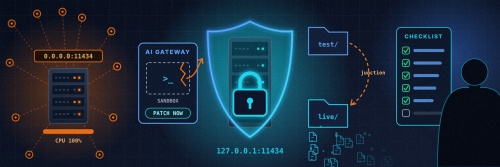
I'm a big believer in running your own AI. It's the whole reason IRL exists. But owning the stack means owning the security too, and over the last few weeks a lot of other people and businesses running their own AI have found that out the hard way. None of this happened to IRL, but every one of these incidents is worth learning from before it happens to you.
None of this needs a security team, just an afternoon on a box you already run.
What others have run into
PoeLLM, a crypto-mining botnet aimed at AI servers. This week Lumen's Black Lotus Labs reported a botnet it calls PoeLLM that has compromised more than 3,400 servers since April, mostly in the US and Western Europe. Many of the victims were running exposed LiteLLM and Ollama instances, alongside Gotenberg and Gitea. Once in, it mines cryptocurrency and uses the server to hunt for the next victim. On LiteLLM it goes after an endpoint covered by CVE-2026-42271, which was fixed in LiteLLM 1.83.7.
A critical flaw in GitLab's self-hosted AI Gateway. On 2 October GitLab disclosed CVE-2026-90970, rated 9.9 out of 10. A logged-in user with Duo Agent Platform access could craft a custom flow that escaped the prompt template sandbox and ran commands on the gateway. It's fixed in AI Gateway 19.2.4, 19.3.2 and 19.4.1. Only self-hosted gateways need action, but if that's you, it's urgent.
A coding agent that reportedly deleted 48,000 files. Last month a Reddit user reported that a Claude Code sub-agent, asked to rebuild a test copy of a project, wrote a cleanup script that followed Windows directory junctions into the live project. By the user's account and the agent's own log, it deleted about 48,000 files in 103 seconds, including the Git object store, so Git couldn't restore anything. It hasn't been independently verified, but the failure mode is real.
None of these is exotic. The people caught out had an exposed port, unpatched software, or an agent with far more reach than its task needed.
The checklist
- Keep model endpoints off the public internet. Ollama's API has no built-in authentication, so anyone who can reach port 11434 can use your models and your hardware. Treat LiteLLM, Open WebUI and llama.cpp's server the same way.
- Bind to localhost. Set
OLLAMA_HOST=127.0.0.1:11434and do the same for other services. In Docker, publish ports as127.0.0.1:11434:11434, not11434:11434. Docker's published ports can bypass ufw rules. - Put a reverse proxy with authentication in front if you need to share. Caddy or Nginx with TLS and proper auth is enough for most small setups. In Open WebUI, turn off open sign-ups once your accounts exist.
- Use a VPN for remote access. WireGuard or Tailscale lets you reach your models from anywhere without opening a port. With Tailscale, share services with Serve (inside your tailnet), not Funnel (the public internet), and use ACLs so only the devices that need the model can reach it.
- Default-deny your firewall. Block all inbound traffic, then allow only what you need. Test from outside your network, for example from your phone on mobile data, rather than trusting the config.
- Patch on a schedule. Upgrade LiteLLM to 1.83.7 or later, update any self-hosted GitLab AI Gateway, and keep Ollama, Open WebUI and llama.cpp current.
- Rotate keys if anything was exposed. A gateway like LiteLLM holds your cloud provider API keys. If it was ever reachable from the internet, assume those keys are burnt.
- Give agents the least privilege that works. Run coding agents under their own user account, with no sudo, no production credentials and API tokens scoped to the task.
- Sandbox anything that can run commands. Use a container or VM, mount only the project folder, and restrict outbound network access. On Windows, check for junctions and symlinks that point outside the sandbox. That's exactly what reportedly went wrong in the file-wipe story.
- Back up before an agent touches files. Push to a remote Git repository and take a snapshot (ZFS, Btrfs or a VM snapshot) before the run. Keep at least one backup the agent can't reach at all, because in the reported wipe the local
.gitfolder went too. - Require approval for destructive actions. Most agent tools can pause for sign-off before deleting, overwriting or running shell commands. Turn it on.
- Watch for miners. Warning signs are CPU or GPU pinned at 100% when nobody's using it, unfamiliar processes (XMRig is a common one), new cron jobs or systemd services, and outbound connections to mining pools. Lumen has published indicators of compromise for PoeLLM that are worth checking against.
A 15-minute self-audit
- Run
ss -tlnpand look for anything listening on0.0.0.0or::that shouldn't be. - Run
docker psand check which ports are published to all interfaces. - Check
nvidia-smiortopfor load you can't explain. - Look through
crontab -land your systemd services for anything you didn't add. - Compare each AI tool's version with its latest release.
If any of that turns something up, take the box off the network first and investigate second.
Own it properly
Self-hosting is still the right call for privacy, cost and control. It just comes with the responsibilities a cloud provider used to quietly carry for you.
Want to build it properly from day one? Join the 30-Day Sovereign Builder Challenge. Over 30 days you go from little or no technical background to running your own secure Linux environment, hardening production-grade servers and deploying your own AI agents, alongside other builders in the IRL community. See the full day-by-day blueprint here: https://imreal.life/page/30-day-challenge
Got a question about locking down your own setup? Post it in the comments below.
Sources
- Lumen Black Lotus Labs, "Canto incognito: tracking the PoeLLM malware": https://www.lumen.com/blog/en-us/canto-incognito-tracking-the-poellm-malware
- BleepingComputer, "PoeLLM malware infects exposed AI servers in cryptomining attacks": https://www.bleepingcomputer.com/news/security/poellm-malware-infects-exposed-ai-servers-in-cryptomining-attacks/
- DevOps Bulletin on X: https://x.com/devopsbulletin/status/2108256139561283777
- Red Hat Bugzilla, CVE-2026-42271 (LiteLLM): https://bugzilla.redhat.com/show_bug.cgi?id=2467924
- GitLab AI Gateway critical patch release (19.2.4, 19.3.2, 19.4.1): https://docs.gitlab.com/releases/patches/other-patches/patch-release-gitlab-ai-gateway-19-4-1-released/
- Raghav Pandurlikar on LinkedIn: https://www.linkedin.com/posts/raghavpandurlikar_cybersecurity-ai-devsecops-activity-7511981020800409600-EuT7
- TechRadar, "A Claude Code AI agent deleted 48,000 files in just over 100 seconds": https://www.techradar.com/pro/security/i-broke-something-a-claude-code-ai-agent-deleted-48-000-files-in-just-over-100-seconds-then-apologized-for-doing-so
- NOPE AI incident record (Claude Code, Windows junctions): https://nope.net/incidents/2026-claude-code-agent-deleted-48000-live-project-files-windows-junctions
- Ollama FAQ (network binding): https://docs.ollama.com/faq
Self Hosting your own secure AI system for all your personal needs.
Using:
Ollama
Gemma 4-12B and other Open Source FREE Models!
Web UI

Review of the amazing
🦞 Clawdbot — Personal AI Assistant
Clawdbot is a personal AI assistant you run on your own devices. It answers you on the channels you already use (WhatsApp, Telegram, Slack, Discord, Google Chat, Signal, iMessage, Microsoft Teams, WebChat), plus extension channels like BlueBubbles, Matrix, Zalo, and Zalo Personal. It can speak and listen on macOS/iOS/Android, and can render a live Canvas you control. The Gateway is just the control plane — the product is the assistant.
If you want a personal, single-user assistant that feels local, fast, and always-on, this is it.
Want to learn how to set this up yourself? Join our community of members just like you learning how to work with AI in real world applications for business, education and life.
CLAIM YOUR PLACE IN THE WORLD NOW
JOIN NOW!

Review of OpenSource Music Maker AI system Heartbeat MULA
HeartMuLa: A Family of Open Sourced Music Foundation Models
HeartMuLa is a family of open sourced music foundation models including:
- HeartMuLa: a music language model that generates music conditioned on lyrics and tags with multilingual support including but not limited to English, Chinese, Japanese, Korean and Spanish.
- HeartCodec: a 12.5 hz music codec with high reconstruction fidelity;
- HeartTranscriptor: a whisper-based model specifically tuned for lyrics transcription; Check this page for its usage.
- HeartCLAP: an audio–text alignment model that establishes a unified embedding space for music descriptions and cross-modal retrieval.
Github: https://github.com/HeartMuLa/heartlib?
Want to learn how to set this up yourself? Join our community of members just like you learning how to work with AI in real world applications for business, education and life.
CLAIM YOUR PLACE IN THE WORLD NOW
JOIN NOW!

Review of Voice Cloning System that runs locally on your own computer.
Qwen3-TTS
Qwen3-TTS is officially live. We’ve open-sourced the full family—VoiceDesign, CustomVoice, and Base—bringing high quality to the open community.- 5 models (0.6B & 1.8B)- Free-form voice design & cloning
- Support for 10 languages
- SOTA 12Hz tokenizer for high compression
- Full fine-tuning support
- SOTA performance
We believe this is arguably the most disruptive release in open-source TTS yet. Go ahead, break it and build something cool. 
Everything is out now—weights, code, and paper. Enjoy. 
Links to Original Tweet:
https://x.com/Alibaba_Qwen/status/2014326211913343303
Github Repo: https://github.com/QwenLM/Qwen3-TTS
Want to learn how to set this up yourself? Join our community of members just like you learning how to work with AI in real world applications for business, education and life.
CLAIM YOUR PLACE IN THE WORLD NOW
JOIN NOW!